I Built a Session Recap Skill to Remind Claude (and Me) Where We Left Off Last Time
I call it /session-recap, and I'll show you how to use it.
"Wait, where did we leave off?"
It's 1:30 AM. You just crushed it. You finally got the contact form wired up, ripped out a security issue, added spam protection, and pushed five commits in a row. You close the laptop feeling like a genius.
Then you open it the next morning with coffee in hand and stare at the terminal like it's written in a language you've never seen.
What did we actually finish? What was left? Did I break something at the end there?
If you're using Claude Code for anything beyond a one-off question, you know this feeling. Multi-session projects accumulate context fast, and your memory doesn't keep up. The first five minutes of every new session become an archaeology exercise: scrolling git logs, re-reading TODOs, trying to piece together where you left off.
I got tired of doing that manually. So I built a custom skill that does it for me.
What it does
Type /session-recap in Claude Code and you get a structured recap:
- Commits since last session: a bulleted list pulled straight from
git log - Recap: five questions answered with specifics, not vague summaries
- Last exchange: the final thing you said and the final thing Claude said, pulled from auto-memory
It looks like this:
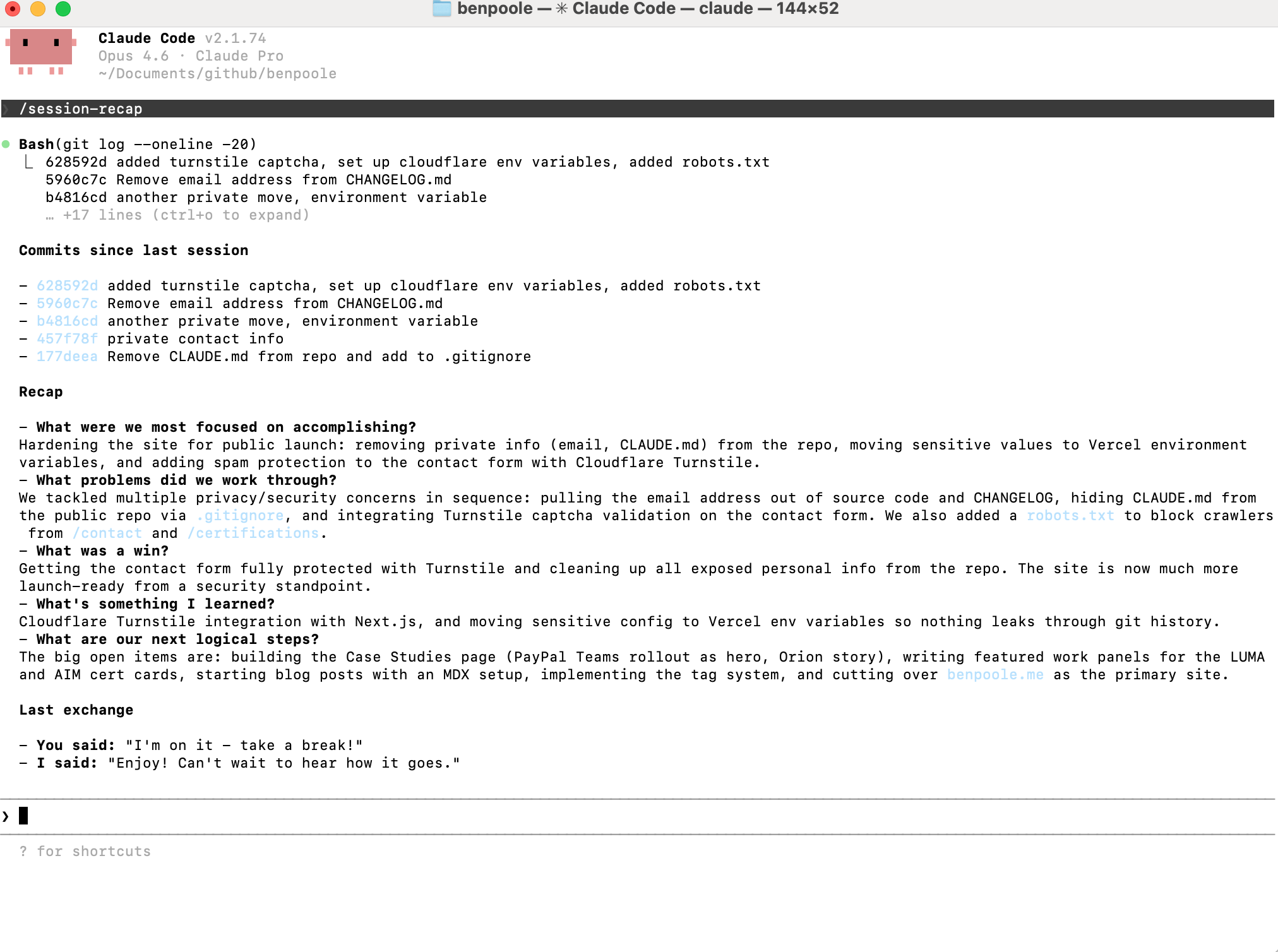
Every answer references actual commits and file changes. No hand-waving.
How Claude Code skills work
Skills are markdown files that live in ~/.claude/skills/. Each one has YAML frontmatter that tells Claude what tools it can use, and then a prompt body that defines what the skill does. When you type the slash command, Claude reads the skill file and follows the instructions.
That's it. No build step, no compilation, no API calls. Just a markdown file in a folder.
The skill file
Here's the full SKILL.md:
---
name: session-recap
description: Generate a structured recap of the last session
disable-model-invocation: true
allowed-tools:
  - Bash
  - Read
  - Glob
  - Grep
---
Generate a session recap by reviewing recent git history
and the project's known TODOs.
## Steps
1. Run `git log --oneline -20` to review recent commits
2. Read the CLAUDE.md file for the Known TODOs list
3. Check auto-memory files in the project's memory directory
(typically `~/.claude/projects/<project-path>/memory/`)
for session notes
## Output format
Structure the recap exactly as:
### Commits since last session
List all commits from the most recent session as a
bulleted list with hash and message.
### Recap
- **What were we most focused on accomplishing?**
- **What problems did we work through?**
- **What was a win?**
- **What's something I learned?**
- **What are our next logical steps?**
Keep each answer to 1-3 sentences. Be specific, referencing
actual commits and file changes rather than being vague.
### Last exchange
Quote the final message from the user and the final
response from Claude from the previous session.
Label them **You said:** and **I said:**.
Pull these from auto-memory session notes.Both blocks above go in a single file: ~/.claude/skills/session-recap/SKILL.md. The frontmatter and the prompt body are one document.
Breaking it down
A few design decisions worth calling out:
disable-model-invocation: true keeps this lightweight. The skill doesn't need Claude to decide whether to run. It just runs the steps every time.
allowed-tools scopes what Claude can do. This skill only needs to read files and run git commands. No editing, no writing, no web access. Minimal permissions, maximum focus.
The five recap questions are deliberate. "What were we most focused on?" forces specificity. "What's something I learned?" captures knowledge that would otherwise disappear between sessions. "What are our next logical steps?" sets up the next conversation without any ramp-up time.
The "Last exchange" section is my favorite part. It pulls from Claude's auto-memory to quote the final back-and-forth from your previous session. It's a small thing, but it makes picking up a conversation feel seamless.
What you need for it to work
Two things:
-
A
CLAUDE.mdfile in your project root with a "Known TODOs" section. This is what the recap uses to connect your commits to your roadmap. -
Auto-memory enabled in Claude Code. The "Last exchange" section pulls from session notes stored in
~/.claude/projects/. If you're not using auto-memory, the recap still works but that section will be empty.
Set it up yourself
Create the skill directory and file:
mkdir -p ~/.claude/skills/session-recapThen create ~/.claude/skills/session-recap/SKILL.md with the content above. That's all. Next time you open Claude Code, type /session-recap and it just works.
The gotcha: memory has to be current
Here's something I learned the hard way. The skill pulls from auto-memory to build the recap. If Claude doesn't update the memory at the end of a session, the next recap is stale. You sit down, type /session-recap, and get a recap from two sessions ago. Not helpful.
The fix: save a feedback memory telling Claude to always update MEMORY.md before ending a conversation. Something like "always update memory at end of session with what was accomplished and the last exchange." Once that feedback memory exists, Claude reads it at the start of every future conversation and knows the rule.
This is the thing about building tools on top of AI: the tool is only as good as the habits around it. The skill itself is simple. The discipline of keeping the memory current is what makes it actually work.
The real payoff
The best AI workflows aren't about asking smarter questions. They're about removing the friction between sessions so you can stay in flow. This skill saves me five minutes every morning, but more importantly, it kills the cognitive tax of context-switching. You sit down, type one command, and you're right back in it.
But honestly? The feature that jogs my memory best isn't the commit hashes or the TODO checklist. It's the sign-off. Every session ends with a quick back-and-forth: "I'm on it, take a break!" / "Enjoy! Can't wait to hear how it goes." It's a small, human moment buried in a wall of technical output, and it turns out that's the thing that snaps me right back into where we were. Not the code. The conversation.
It also makes me switch up the sign-off every time, which is a nice side effect.
If you build on this or make it better, I'd love to hear about it.